Piqelo Monitors.
Full Piqelo Review · US market

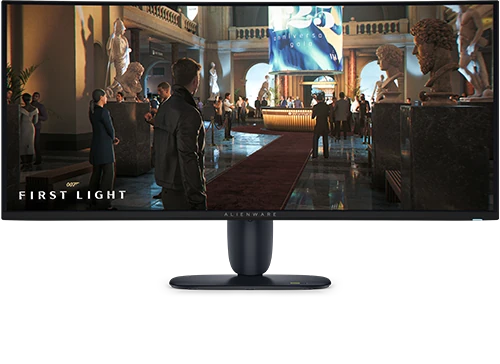
Dell Alienware AW3426DW

A 34-inch 3440x1440 280Hz Penta Tandem QD-OLED ultrawide with improved text layout and current-generation HDR performance.

Size
34"
Resolution
3440x1440
Panel
Penta Tandem QD-OLED
Refresh
280Hz
HDMI 2.1
Piqelo Score85/100Our overall product assessment
Search Score86/100Match to your preferences

Match estimate · research ongoing

How these scores work

The Piqelo Score is our published assessment of this exact product, including value. Your search does not change it. The Search Score uses the underlying research, your preferences and comparison with similarly priced products. Value is counted once; budget and required features are hard limits.

Product score published: 2026-10-07.

The match remains an estimate while supporting research is checked. It is not a new final product score.

Price comparison: $600.00 to $999.98 (±25% of this product’s price). Comparable evidence is limited.

Dell Alienware AW3426DW
Decision snapshot

Ultrawide OLED value

Best for: High-end ultrawide gaming with excellent picture quality

Think twice if: You need USB-C power/KVM or productivity-first pixel density

PC gamingMixed use
Plus points
  • 280Hz QD-OLED gives fast, clean ultrawide motion
  • Penta Tandem QD-OLED offers deep blacks and vivid HDR color
  • RGB-stripe layout improves text clarity versus older QD-OLED layouts
Keep in mind
  • No full USB-C laptop-docking setup
  • Ultrawide compatibility varies by game and workflow
  • OLED static-content care still applies
At a glance

Pros and cons

The main reasons to choose it, and the compromises to weigh up.

What we like

  • 280Hz QD-OLED gives fast, clean ultrawide motion
  • Penta Tandem QD-OLED offers deep blacks and vivid HDR color
  • RGB-stripe layout improves text clarity versus older QD-OLED layouts

Keep in mind

  • No full USB-C laptop-docking setup
  • Ultrawide compatibility varies by game and workflow
  • OLED static-content care still applies
Test results

Image quality, explained

Selected independent measurements, with what they mean in everyday use. Picture mode and test method matter; these results are not additional Piqelo scores.

Everyday brightness

Higher = brighter
SDR brightness
321 nitsMaximum sustained · sustained

SDR is everyday desktop content. More brightness can help in a lit room; reflections and the size of the bright area still matter.

One independently tested sample; lab settings and methods affect results.

HDR highlights

Higher = brighter highlights
HDR brightness
1,330 nits2% window
HDR brightness
540 nits10% window
HDR brightness
330 nits100% window

HDR measures bright highlights in games and video. A small-window peak is different from full-screen brightness, so check the window and mode.

Color accuracy

Lower ΔE = less error
Grayscale error · ΔE
1.46 DeltaEDefault
Grayscale error · ΔE
0.44 DeltaECalibrated

Delta E measures the difference from the target color or gray. A calibrated result describes that setup; it does not establish factory accuracy.

One independently tested sample; lab settings and methods affect results.

Motion & delay

Lower time = faster
Black-to-white response
0.24 msOne-inch square

Pixel response affects moving edges. Input lag is delay before the image starts changing; screen draw and signal processing are separate tests. Compare like-for-like methods.

Response, signal processing and total lag are different metrics; do not compare across lab methods.

No independent measured result in this profile yet for black depth & contrast, color range, screen consistency.

Explore all findings, test settings and sources
Owner context · excluded from rating
4.8/5108 Dell reviews

What owners mention most

QD-OLED picture quality280Hz gamingultrawide immersion

Open exact-model owner reviews →

Close alternatives

When another monitor makes more sense

Piqelo does not force one universal winner. These are the closest researched alternatives when your priorities shift.

Research & detailsSources, measurements and full specificationsHide details
Decision confidence

How stable is this recommendation?

Confidence and evidence maturity stay separate from product fit and commerce.

Recommendation stabilityHighMultiple independent sources support a high-confidence exact-model profile.
Owner evidence4.8/5Exact-model owner signal is kept separate from expert testing.
Current buying routes4Commerce never changes the recommendation order.
Product views
Dell Alienware AW3426DW
Key specifications

The attributes that change the decision

Specs are kept separate from judgment so a fast number does not hide a practical trade-off.

Screen34"
Resolution3440x1440
PanelPenta Tandem QD-OLED
Refresh280Hz
Response0.03 ms GTG
HDMI 2.1Yes
USB-C power—
KVMNo
Transparent research

Sources behind this profile

Independent expert testing, exact-model owner signals and manufacturer specifications are visibly separated. Piqelo never counts itself as product evidence.

Manufacturer-hosted owner reviews · excluded from rating · 4.8/5 · 108 reviewsDell customer reviews show a large, strongly positive exact-model sample for the AW3426DW.Checked 2026-09-28Open exact source →
Manufacturer specification sourceDell evidence for Dell Alienware AW3426DW.Checked 2026-09-28Open exact source →
Independent expert sourceExact-model ultrawide review praises image quality and bright HDR. Its value assessment includes a simple feature set and review-time pricing.Checked 2026-10-07Open exact source →
Independent expert sourceRTINGS evidence for Dell Alienware AW3426DW.Checked 2026-09-28Open exact source →
Independent expert sourceOriginal 2026 AW3426DW ultrawide QD-OLED review supplies exact-generation evidence rather than older AW3423DW or AW3425DWM results.Checked 2026-09-30Open exact source →
Independent expert sourceExact-model 34-inch 280Hz QD-OLED test reports sharp imagery, strong brightness and smooth gaming. Speakers and headphone output are absent.Checked 2026-10-07Open exact source →

Exact-model findings and measurements

Supported finding · hdr image

TechSpot measured about 1,330 nits in a 2% HDR window, 540 nits at 10%, and up to 330 nits full-screen. Peak 1300 mode favors small highlights; the True Black mode offers more consistent but lower output.

HDR brightness
1,330 nits2% window
HDR brightness
540 nits10% window
HDR brightness
330 nits100% window
TechSpot Open exact source →
Supported finding · hdr

The review found strong image quality and bright HDR from the updated ultrawide QD-OLED panel.

PCWorld Open exact source →
Supported finding · motion

Tom's Hardware reported 0.24 ms black-to-white transition (One-inch square); 14.1 ms total control lag (Tested native refresh).

Black-to-white response
0.24 msOne-inch square
total control lag
14.1 msTested native refresh

Response, signal processing and total lag are different metrics; do not compare across lab methods.

Tom's Hardware Open exact source →
Supported finding · color

Grayscale error measured 1.46 dE before and 0.44 after calibration.

Grayscale error · ΔE
1.46 DeltaEDefault
Grayscale error · ΔE
0.44 DeltaECalibrated

One independently tested sample; lab settings and methods affect results.

Tom's Hardware Open exact source →
Supported finding · color

PCWorld measured 98% DCI-P3, 94% Adobe RGB gamut coverage.

color gamut coverage
98%Tested native mode · DCI-P3
color gamut coverage
94%Tested native mode · Adobe RGB

Coverage is distinct from gamut volume and does not establish color accuracy.

PCWorld Open exact source →
Supported finding · sdr image

PCWorld measured SDR 321 nits (Maximum sustained).

SDR brightness
321 nitsMaximum sustained · sustained

One independently tested sample; lab settings and methods affect results.

PCWorld Open exact source →

Next steps

Put this monitor in context

Trust & transparencyIndependent by design.

Some retailer links may be affiliate links. Commercial relationships never buy a score, recommendation, award or retailer order. As an Amazon Associate I earn from qualifying purchases.